

Internal linking is a key aspect of on-page SEO techniques, helping to enhance search engine crawling and indexing, distribute page authority, improve user experience, and establish content relationships — all of which contribute to higher search rankings. But how do you know if you’re doing your internal linking properly? There’s a level of precision needed for this deceptively simple on-page SEO tactic. Use this guide to make sure you’re getting everything you can from your internal linking strategy.
What is internal linking in SEO?
An internal link is simply a hyperlink that points from one page to another within the same domain. When a link points to another location on the same page, it’s called a jump link, or anchor link. By contrast, an external link is a hyperlink that points from a page on one domain to a page on another domain.

Components of an internal link
Here is the format for a hyperlink in HTML:
<a href=”destination URL“>anchor text</a>
Anchor text
This is the word or phrase on the page that, if clicked, would take you to another page. Typically, when there is a hyperlink present, the anchor text appears underlined, like so.
Destination URL
This is the page that you would arrive at if you clicked on the hyperlinked text.
Difference between internal and external links
On-site internal linking
Internal on-site links point from your current page to another internal page. These are typically visible to you as a site visitor in the form of hyperlinked text. It’s important to strategize about internal linking in SEO because a site’s internal link structure sends signals about its content and the context of each page, as well as leading users to relevant, related content.
External links
Sometimes called backlinks, inbound links point from another website to a page on your site. Unless a visitor has followed one of these links to land on your page, they will usually not be aware of them. However, backlinks are important because they can be a search engine ranking factor as a proxy for experience, expertise, authority, and trustworthiness (E-E-A-T). Learn more about how to use backlinks for SEO.
Eight types of SEO anchor texts (and how to choose the one for your situation)
The words you use to anchor your internal links matter.
Remember: try not to repeat the same anchor text/link combination on a page. Repeated anchor text could seem spammy to search engines unless it appears naturally and makes sense. With that, here are the various anchor text types and anchor text best practices.
1. Branded
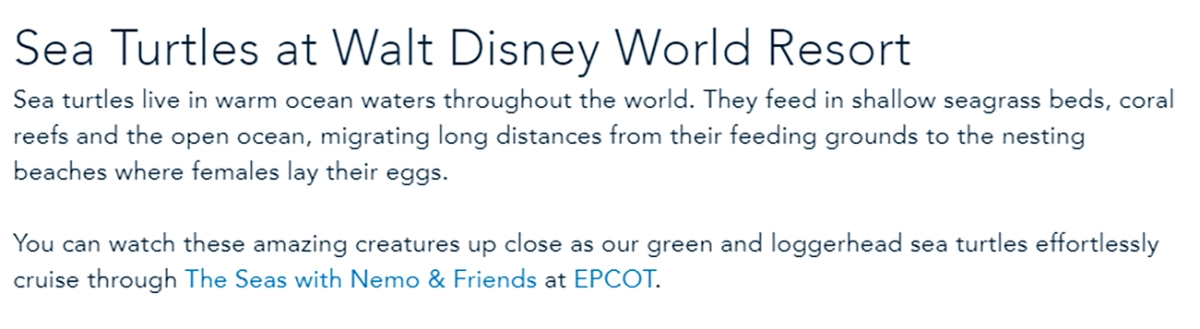
Anchor text that includes a brand or product name can help build brand authority and entity recognition. For example, “The Seas” attraction and EPCOT are linked here:
2. Branded+keyword
A brand+keyword anchor is a branded phrase that includes your brand name (or a variant) and a keyword.
For example:

When you’d like to position your brand as being an authority on a certain topic, this is a good way to associate your brand name with that term. The destination page should contain both your brand name and this topic.
3. Exact match
Exact match anchors include the precise keyword(s) found on the page you are targeting.
For example:
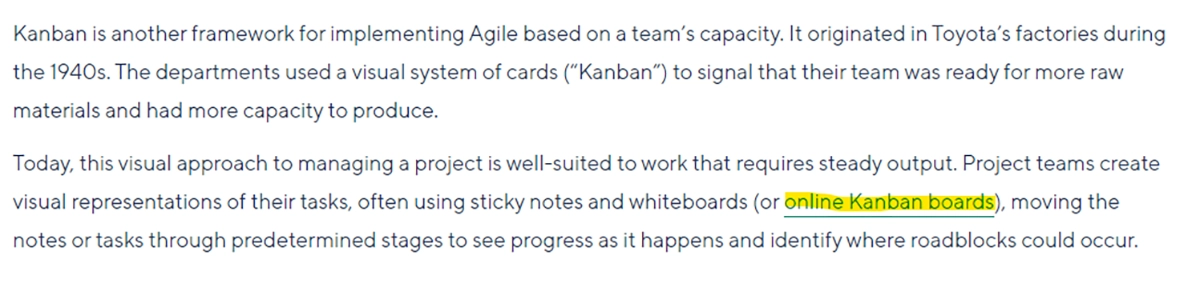
By using keywords as SEO anchor text, you are signaling the importance and value of that page when it comes to the given topic, and both search engines and human visitors take note of this association.
4. Partial match
Partial match anchors include a keyword with additional (potentially generic) terms.
For example:
You can find a list of common questions about shipping here.
Partial match anchors may have more weight for search engines than a generic anchor, but the anchor should ideally be an exact natural match (without repeating anchor text used elsewhere on the page).
Partial match anchor text can be useful if generic phrases align with sub-keywords targeted on a page, for instance, ‘best practices cloud computing.’
5. Related
Related anchor text uses a variation of the keyword. For example:
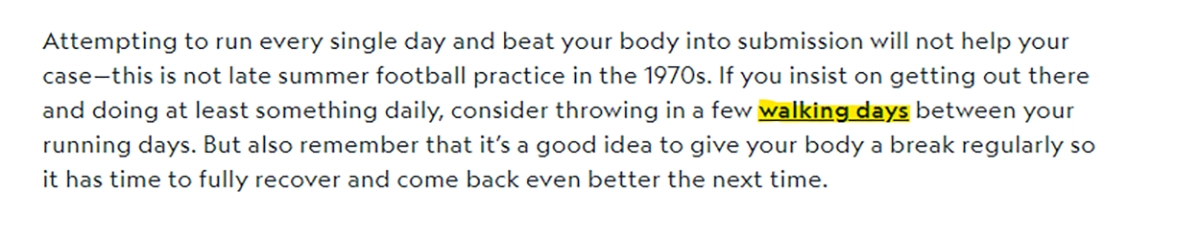
If it is not possible to get an exact match or partial match of the target keyword, then a variation of it would be the next-best scenario because the destination URL would still be associated with the same or similar topic.
In the example above, the exact match keyword would have been “how to make your walk more challenging,” but that phrase won’t work in that sentence. As a next-best option, the semantically related phrase “walking days” is used instead.
6. Random
Random anchor text includes non-keyword-related and non-CTA phrases. For example:
View our latest findings. jpeg. Pdf.
This is typically not recommended when there is another option because there is no clear relationship between the anchor text and the destination URL. This ambiguity can create search engine confusion.
7. Generic
A generic anchor usually includes a simple CTA. For example:
Let’s talk about our products. Learn more.
This is generally not recommended because it does not contribute additional context about the destination URL or add keywords that can be associated with the destination URL. Google has also stated that this does not align with their understanding of anchor text best practices.
8. Naked
A naked text link is a clickable URL pasted into the body of the text. For example:
Visit our website to find out more: https://sample.com.
This is typically not recommended because it does not add any additional context to the destination URL.
Why is internal linking important for SEO?
Now that you have a good idea of what internal linking is, let’s look closer at why it matters.
Internal links assist crawlers in navigating a website and its architecture and allow page authority to be distributed from one page to others throughout the site. A clear internal link structure also provides search algorithms with content clusters, indicating context and hierarchy and saving Google some effort. In return, Google may distribute page authority across interlinked pages.
And finally, for your visitors, internal links improve user experience and encourage exploration and engagement with your site.
Purposes of Internal Linking in SEO
While interlinking SEO benefits aren’t guaranteed, you may see:
- Improved indexing of the site
- Enhanced website navigation and user experience
- Clearer and more comprehensive site structure
- Improved site engagement
- Increased number of long-tail keywords
- Improved CTR
- Organic traffic boost
- Increased Goal Completions to Targeted Pages (when combined with intent-focused strategies of linking and appropriate CRO initiatives)
How to find relevant pages for linking
Using the site search operator in Google Search
Google Search has a built-in site search operator that can be used for looking at all indexed pages within a given site, even if the site itself does not have a search bar. (Note: If the type of destination URL you are looking for is not indexed, such as for a gated PDF, it will not show up in the search results.)
Simply type the following into Google Search:
site:site name keyword topic (ideally, this would be your anchor text as well)
For example:

Internal links indicate to search engines that the link you’re providing is of such high relevance and importance that visitors would miss out by not having a quick way to navigate there.
The best interlinks should:
- Be of high value to the user
- Be informative
- Closely match the context of the content users are reading.
To get even more granular, you can search within a specific subdomain of the overall site or search for an exact match of your keyword topic that excludes variations. Feel free to play around with this to see if you can get different results.
For example:

From there, you can browse the search results to find a relevant page on your site to internally link to.
How to find anchor text opportunities when improving on-page SEO techniques
When looking for internal linking opportunities, consider whether other existing pages speak to the topics mentioned on the current page. Use the site-search operator to discover all the pages that explore a particular topic. If such pages don’t exist, reach out to your SEO team to assess the search potential for these terms and if creating content on them would be valuable.
How to ensure that you’re using the best link
Here are some internal linking best practices to keep in mind:
- Ensure you don’t have links pointing to redirected pages or 404 pages
- What? – Redirected pages are pages that have moved to a new URL, and 404 pages are broken pages.
- Why? – Linking to such pages can slow loading speed and hurt user experience. From an SEO standpoint, it can impact link equity distribution.
- How? – Occasionally check for internal links pointing to redirected pages or sunsetted pages that now return 404s.
- Link to URLs that don’t contain query parameters, unless otherwise specified
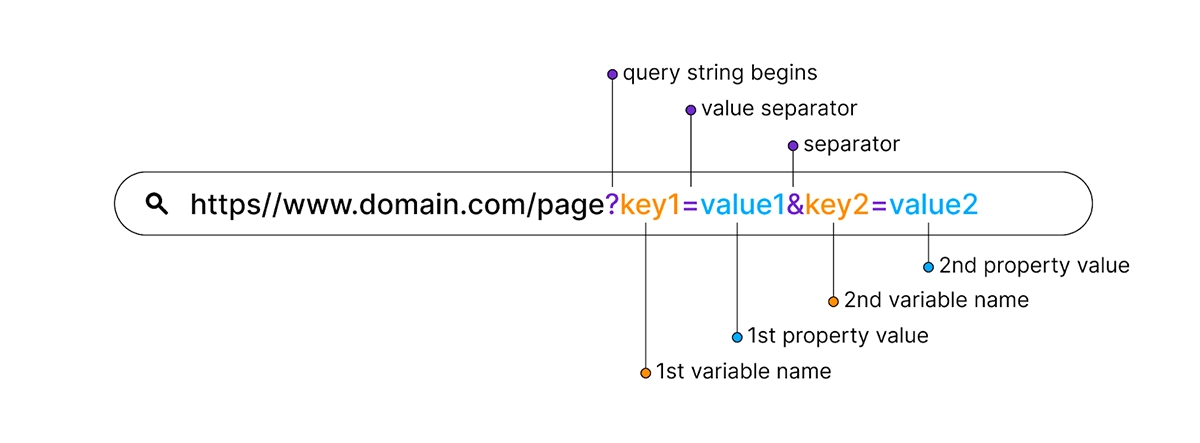
- What? – Query strings begin with a “?” and look like key-value pairs as in the image below. Learn more about parameter SEO considerations.
- Why? – Sometimes, it’s okay to link to parameter URLs if a site uses them for a specific tracking reason. However, because tracking parameters can change over time, it’s best to pass the link equity to a permanent, root URL.
- How? – Try to select URLs that don’t contain a “?” and query string (like the example image), unless there’s a specific reason to do so.
- Always use the do-follow link setting for internal links
- What? – Do-follow vs. no-follow links: Each link you implement can provide a directive to crawlers — “do-follow” or “no-follow.” The recommendation from Google is to use the do-follow directive for internal links.
- Why? – PageRank (link equity) comes into your site and flows throughout it based on your internal links. Having ‘no-follow’ in your internal links causes those links to drop out of the PageRank and stop distributing link equity.
- How? – All links, by default, are “do-follow.” You only need to specify a “nofollow” attribute when you do not want links to be followed.
- Keep users in the same window when linking internally, and open a new window when linking externally (in most cases)
- What? – When linking, you have the option to control whether the new link opens in a new tab or window or changes the current page.
- Why? – Opening an internal link in a new window may feel abrupt to users. From an SEO standpoint, there is no data to suggest any impact of this decision either way, though this can impact page engagement metrics. Opening external links in a new tab allows your website to remain open so users can easily come back to resume their session.
- How? – Ensure that internal links open in the same window, while non-related links (such as sign-up forms or log-in to console links) open in a new tab. This allows users to navigate back to the original page when needed.